Pick an App
One-click AI tools that transform your creative workflow.
Seedream 5.0
Select model
Seedream 5.0
Qwen Image 3
Choose Aspect Ratio
Aspect Ratio
9:16
16:9
4:3
3:4
1:1
3:2
2:3
5:4
4:5
21:9
Choose Resolution
Resolution
1K
1024px
2K
2048px
AI Lingerie Try-On for Brands and Online Stores
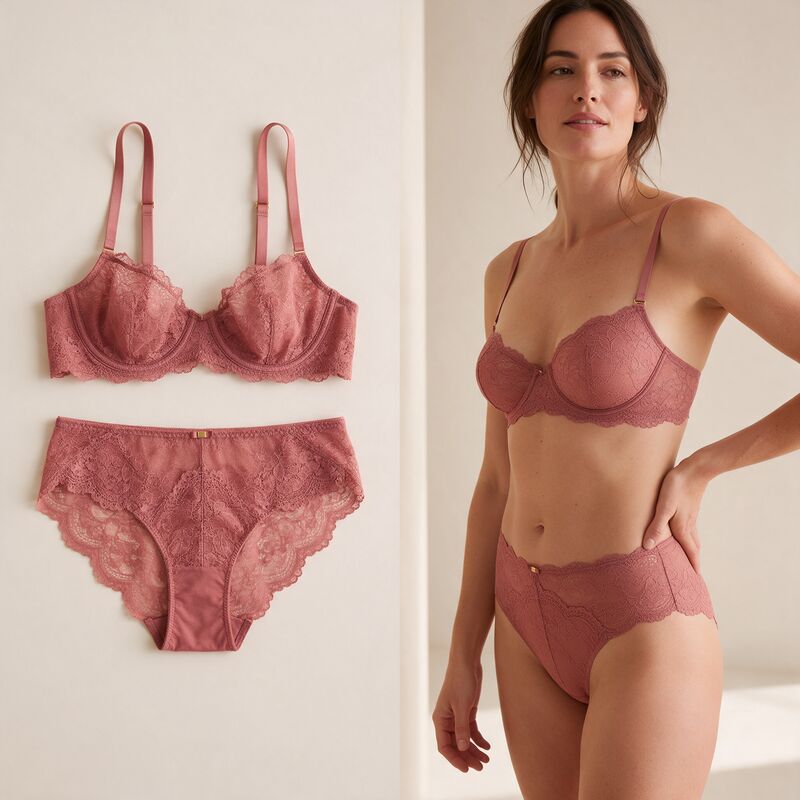
Fash Studio Lingerie Try-On is an AI tool that turns a lingerie product photo (a flat lay, ghost mannequin shot or packshot) into a realistic on-model image. You upload the product, pick one of the built-in models and press Run. It is made for lingerie brands and online stores that need catalog images without a photoshoot.
How AI Lingerie Try-On Works
Fash Studio Lingerie Try-On takes three steps: upload the product, choose a model, then generate and download.
- Upload your lingerie. Add a photo of each piece to the Lingerie box as a JPEG, PNG or WebP file up to 10 MB. Seedream 5.0 takes up to 9 pieces in one run, and Qwen Image 3 takes up to 2.
- Choose a model. Pick a built-in model, then set the aspect ratio and 1K or 2K resolution. An optional prompt lets you ask for a pose, lighting or styling change.
- Generate and download. Press Run. Each request goes through a short automated review, then the AI dresses the model in your pieces. Most results are ready in under a minute and appear in your History for download.
The flow works like AI virtual try-on for clothing. To prepare your product shots, read the guide to flat lay to on-model images.
Lace, Mesh and Satin Details That Stay True to Your Product
Fash Studio Lingerie Try-On keeps the construction of each piece as it appears in your photo, because the AI is instructed to change only who wears it.
Lace keeps its motif and scalloped edges, and the pattern follows the curve of the body instead of lying flat like a print. Mesh panels keep their structure and the way they sit over the lining. Satin keeps its sheen, with highlights where the light in the scene would fall on a curved surface.
Small parts stay in place: strap width and slider position, underwire shape, hook and eye closures, bows, rings and trims. Seams and bands follow the body at a realistic tension, and the color is matched to your product photo, so a dusty rose stays dusty rose.
What You Can Try On
Fash Studio Lingerie Try-On supports bras, bralettes, bodysuits, lingerie sets, babydolls, corsets, sleepwear and loungewear.
Bras
Balconette, plunge, T-shirt and strapless bras keep their cup shape, underwire line and strap setup. Lay the straps out flat so the AI can read how they attach.
Bralettes
Triangle and longline bralettes keep their lace edging and band width. Add the matching brief to the same run to show the set together.
Bodysuits
Bodysuits keep their neckline, cup detail and leg line. A flat lay with the whole garment in frame works best.
Lingerie Sets
Lace sets and satin sets run as one job, with each piece as its own photo or the whole set in one image. The pieces keep a matching color and finish.
Babydolls
Babydolls keep their length, hem and the way the fabric falls from the bust. Upload the matching brief with it if it comes as a set.
Corsets
Corsets and bustiers keep their boning lines, lacing and front closures. A straight front photo shows the AI where each channel sits.
Sleepwear
Slip dresses, camisole sets, pajamas and nightgowns drape naturally on the model.
Loungewear
Lounge sets, robes and knit pieces keep their texture and trims. Ask for a relaxed pose in the prompt for this category.
Show Every Piece on Diverse Models and Sizes
Fash Studio Lingerie Try-On lets you show the same piece on models with different body sizes, including plus size, and different skin tones. Run the same product photo with another built-in model, and the lingerie stays the same while the person changes. The model library covers a wide range of body types and skin tones, and new models are added regularly.
Size-inclusive images matter more for lingerie than for most categories. Fit is personal, and a shopper choosing a bra or a bodysuit wants to see it on a body close to their own before buying. Ask for a front, side or back view in the prompt to build a full gallery for each size. To keep a finished image and change only the person in it, you can also swap the model.
On-Model Lingerie Photos for Every Channel
Fash Studio Lingerie Try-On gives you on-model images for product pages, collection launches, marketplaces, social media and ads.
Product pages and launches
Put on-model views next to the flat lay on each product page, with one background across the catalog. Photograph new samples as flat lays when they arrive, and the on-model images are ready for launch day.
Marketplaces and cross-border stores
Many marketplaces ask for a plain background on the main image. Change the background afterward to fit each store.
Social media and ads
Use the 4:5, 9:16 or 1:1 ratio for feeds and stories. You can turn product photos into videos for reels, or make UGC try-on videos where a creator presents your product.
Each ad platform has its own policy for underwear and lingerie ads, so check it before you launch a campaign.
AI Lingerie Try-On vs a Traditional Photoshoot
AI lingerie try-on is faster and costs less per image, while a traditional photoshoot gives you more control for hero campaigns. AI try-on fits the daily work of a catalog: new colorways, size ranges, marketplace images and tests before you commit to a shoot. For the basics behind the technology, read what AI virtual try-on is.
| Feature | AI lingerie try-on | Traditional photoshoot |
|---|---|---|
| Time | Under a minute per image | Days to weeks for booking, shooting and retouching |
| Cost items | Credits per image | Models, photographer, studio, styling and retouching |
| Model and size variety | Any built-in model, one run per model | The models booked for the day |
| Revisions | Run again with a new prompt or model | Often a reshoot |
| Images per product | As many as you need from one product photo | Limited by time on set |
| Best for | Catalog volume, size ranges and variations | Hero campaigns and brand storytelling |
Responsible Use and Privacy
Fash Studio Lingerie Try-On only dresses our built-in adult models in your products, and every request is checked before an image is made.
- Adults only. You must be 18 or older to use Fash Studio, and every built-in model is an adult. Requests that refer to a minor or ask to make a model look younger are blocked.
- Products, not people. You upload product photos only, so the tool cannot put lingerie on a photo of a real person. Upload only products you have the right to use.
- It dresses the model. Prompts that ask to remove, open or shrink a garment, or to create explicit content, are blocked.
- Automated review. An AI model reviews every request before generation. A blocked request is not refunded and counts as a warning, and a third warning closes the account under our User Agreement. Every result is checked once more before you see it. If it fails, it's withheld and your credits are refunded. If you think a block was a mistake, email info@fash.studio and a person will review it.
- Your uploads. Uploads and results, except results withheld by the safety check, stay in your private library for as long as your account exists, and they are sent to our AI providers to review and generate your requests. The Privacy Policy explains storage, deletion and your rights.
Tips for Realistic Results
Fash Studio Lingerie Try-On gives the most accurate results from sharp, evenly lit product photos.
- Even lighting. Light the product from the front or a large window, so lace and satin show their texture without hard shadows.
- A plain background. Shoot on a plain surface, or remove the background first, so the AI reads only the product.
- Straps and details visible. Lay the straps out flat, show the closure and keep bows and trims in view.
- The full product in frame. Keep the whole piece in the photo with a little space around it.
- High resolution. Upload the largest sharp file you have. For a small photo, upscale the image before you upload it.
- Sets as separate photos. Upload a bra and a brief as two photos for the most detail, or one photo of the full set when every piece is clearly shown.
Limitations
Fash Studio Lingerie Try-On makes visual previews, and three limits apply.
- It is a visual preview, not a sizing tool. The result shows how a piece looks on a model. It does not tell a shopper which cup or band size to buy.
- Very fine detail can soften. Very fine mesh and tiny lace motifs can lose some detail, most of all at 1K resolution.
- The result depends on your photo. Blurry or dark product photos give weaker results, so start from the best photo you have.
Pricing
Fash Studio Lingerie Try-On runs on credits, and one image costs from 9 credits depending on the AI model and resolution. The Run button shows the exact price before you start, and each plan card on the Fash Studio plans page shows how many try-ons its monthly credits cover.
Upload your lingerie and pick a model above to see your first result.
Frequently Asked Questions
What is AI lingerie try-on?
AI lingerie try-on puts a lingerie product onto a model image using AI. On Fash Studio, you upload a product photo and choose a built-in model, and the AI returns a realistic image of that model wearing the piece.
How do I create on-model lingerie photos without a photoshoot?
Photograph the product once and run it through Fash Studio Lingerie Try-On. Upload the flat lay, ghost mannequin shot or packshot, pick a model, and press Run. Most results are ready in under a minute.
What lingerie types does Fash Studio support?
Fash Studio supports bras, bralettes, bodysuits, lingerie sets, babydolls, corsets, sleepwear and loungewear. Lace, satin, mesh and cotton pieces all work, and you can upload a full set in one run.
Does the AI keep lace, mesh and strap details accurate?
Yes, in most cases. The AI keeps lace motifs, satin sheen, strap width, hooks and trims as they appear in your product photo. Very fine mesh and tiny lace patterns can soften at 1K, so use 2K and a sharp photo for detailed pieces.
Can I show the same piece on plus size models and different skin tones?
Yes. Run the same product photo with different built-in models to show it on several body sizes, including plus size, and skin tones. The lingerie stays the same in every image.
Can I try on lingerie on my own photo before buying?
No. Fash Studio Lingerie Try-On only works with its built-in models, and photos that show a person's face are rejected. It is made for brands and stores that need product images, not for personal fitting.
Is AI lingerie try-on free?
No. Fash Studio has no free trial or free plan, and every try-on uses credits. One image costs from 9 credits, and each plan card on the pricing page shows how many try-ons its monthly credits cover. If you are not happy with the results, you can request a refund of your first subscription payment within 30 days (see our User Agreement).
Can I use the images on my store and in ads?
Yes. You can use them on product pages, marketplaces, social media and ads, as long as you have the rights to the products shown. Each ad platform has its own policy for underwear ads, so check it before you launch a campaign.
Are my uploaded photos private, and whose photos can I upload?
Yes, your uploads and results stay in your private library and are not shared with other users. You can upload only product photos that you own or have the right to use. A photo that shows a person's face is rejected and refunded, so crop the face out of on-model shots.
Which AI models power the lingerie try-on?
Fash Studio Lingerie Try-On runs on two image models: Seedream 5.0 by ByteDance and Qwen Image 3 by Alibaba. Before generation, a separate AI model reviews each request against our content rules.
Related Tools
- AI virtual try-on: Put any garment on a model photo.
- Model Swap: Keep a finished shot and change the person wearing it.
- Background Replace: Put a finished image on a new studio or location background.
- Image Upscale: Raise a small product photo or a finished result to up to 4K.